Wsla 2.1 Update: Advanced Analytics, QR Tools & More
Discover what's new in Wsla 2.1: advanced analytics, protected short links, QR export options, theme typography, RSS feeds and easier link management.
Wsla 2.1 is a focused update to the Wsla link-in-bio experience, bringing more control over analytics, QR codes, short links and everyday profile management. This release builds on the Wsla 2.0 foundation with new ways to understand visitors, share destinations and manage your content. Explore the improvements below, with screenshots from our interactive demo. Demo data is illustrative, and availability of individual features may depend on deployment and plan.
Whether you're a content creator in Bahrain, a boutique in Riyadh, a musician in Dubai or a team managing several social accounts, your bio link should be easy to understand and easy to maintain. A single useful page can guide visitors from an Instagram Reel to your shop, from a printed QR code to a booking page, or from an event poster to your latest work.
What's included in Wsla 2.1
Wsla 2.1 builds on the mobile-first Wsla 2.0 workspace rather than replacing it. Profile editing, appearance, social links, analytics and sharing remain at the center of the experience. The 2.1 changes focus on richer analytics, more flexible QR exports, protected short-link access, theme-font consistency, language-specific blog feeds and faster link management. Wsla continues to support Arabic and English, with French localization expanding.
- Advanced analytics tools: CSV export, dimension filtering, chart choices, city mapping and social-icon details.
- Protected short-link unlock flows for supported access restrictions.
- QR export options including EPS and animated GIF, subject to compatibility and scan testing.
- Theme application that preserves typography settings.
- Localized RSS feeds for English, Arabic and French blog content.
- A confirmation step to deactivate all active link-in-bio links without deleting them.
- The familiar mobile-first Wsla workspace for profiles, links, appearance and sharing.
Explore the refreshed interactive Wsla demo
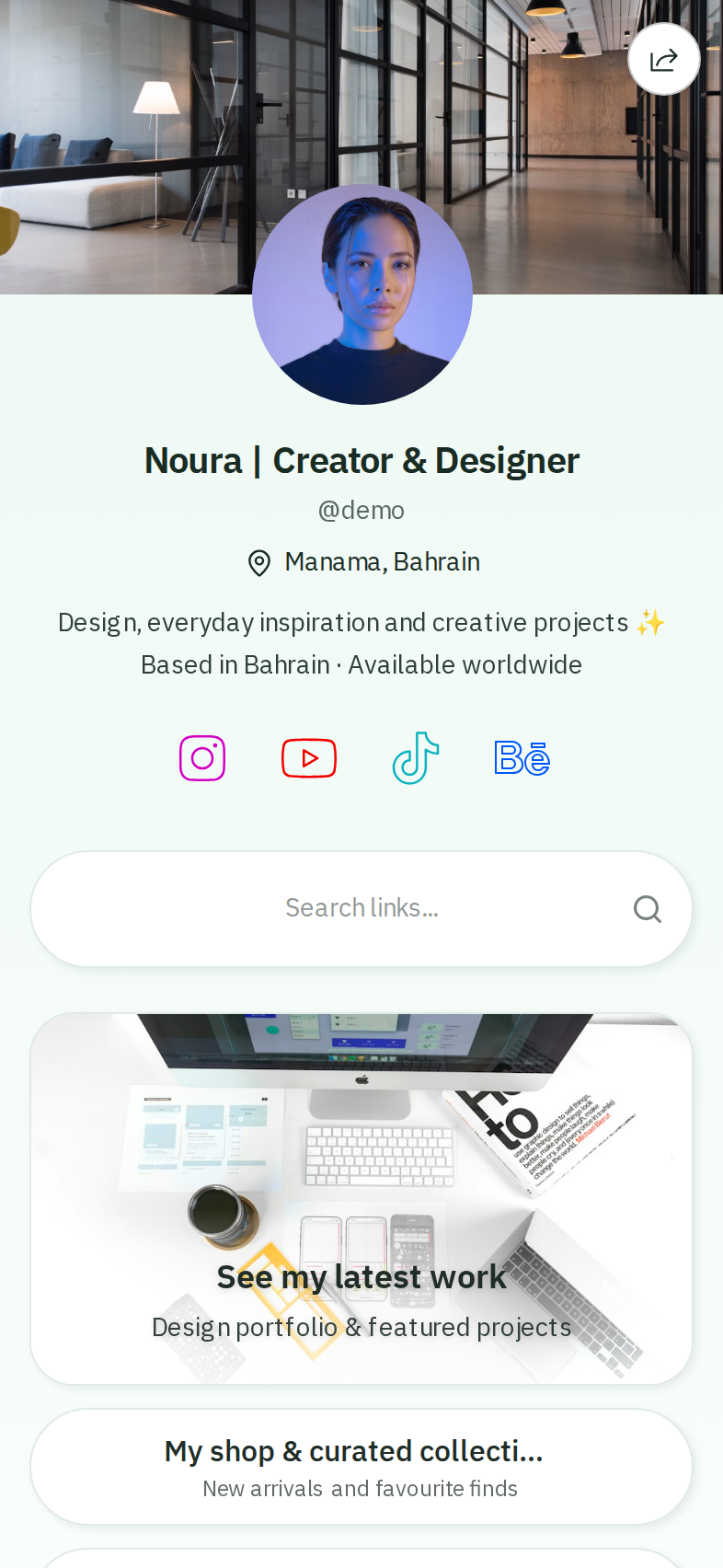
Visit Wsla.to/demo to see a fully fictional creator profile. The sample profile belongs to “Noura,” a made-up designer based in Bahrain. You can browse her public page and use demonstration sections to understand how creators organize links and measure interest. All demo numbers, links and audiences are illustrative. They are not a real person's data.
A good profile needs a clear identity, a short explanation and a small set of valuable actions. The sample page starts with a portfolio, shop, video and booking link. Notice how the hierarchy tells visitors where to go without overwhelming them. When you build your own page, put the link most relevant to your current campaign near the top.
Keep your links readable and current
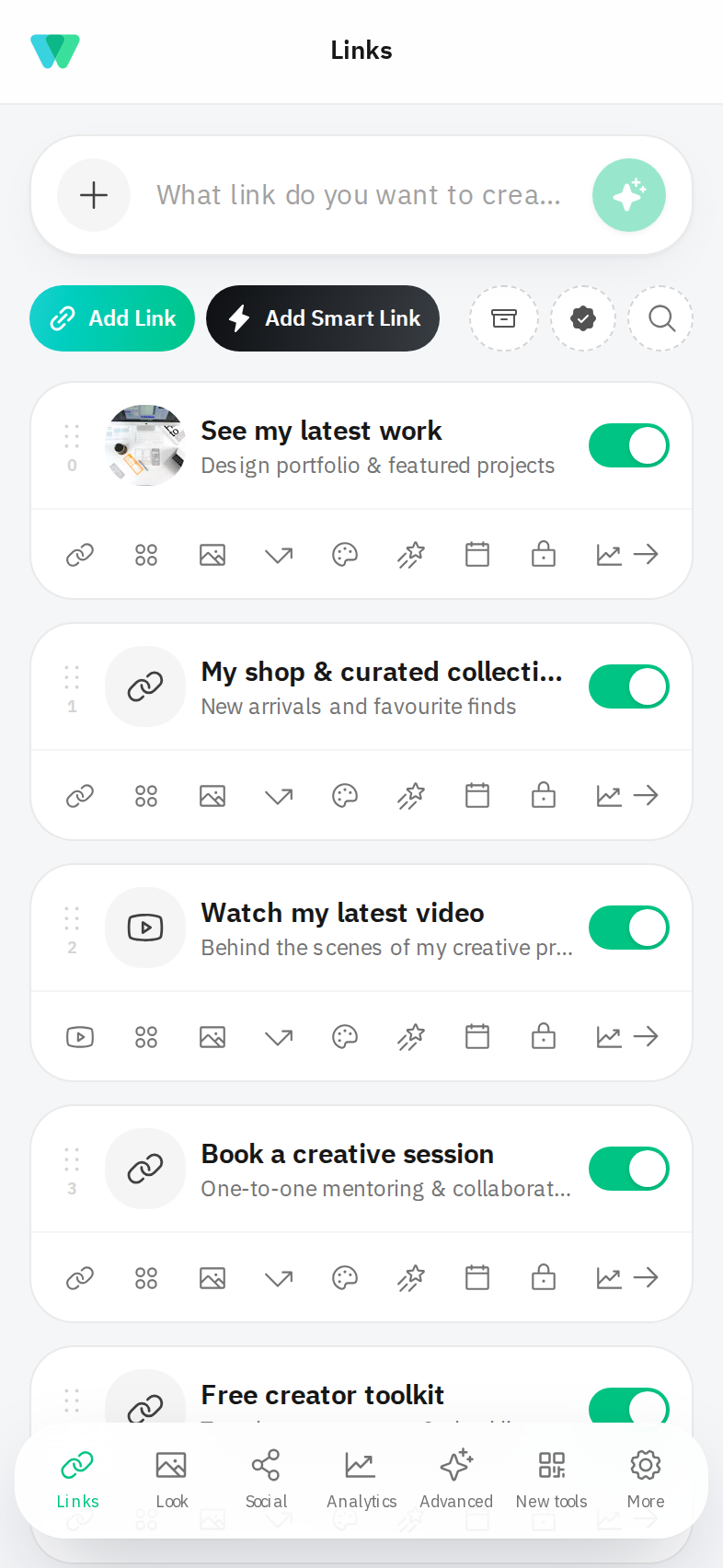
The Links workspace helps you manage the destinations people see on your page. Give each button a direct label: “Shop our new collection” works better than “Click here.” Pair a featured link with a relevant visual when the content benefits from it. You can also mix different actions — video, portfolio, booking, location and contact — rather than forcing everyone into the same path.
Make the page look and feel like your brand
The 2.1 theme-font fix is designed to retain the selected typography when a theme is applied, helping profiles stay visually consistent.
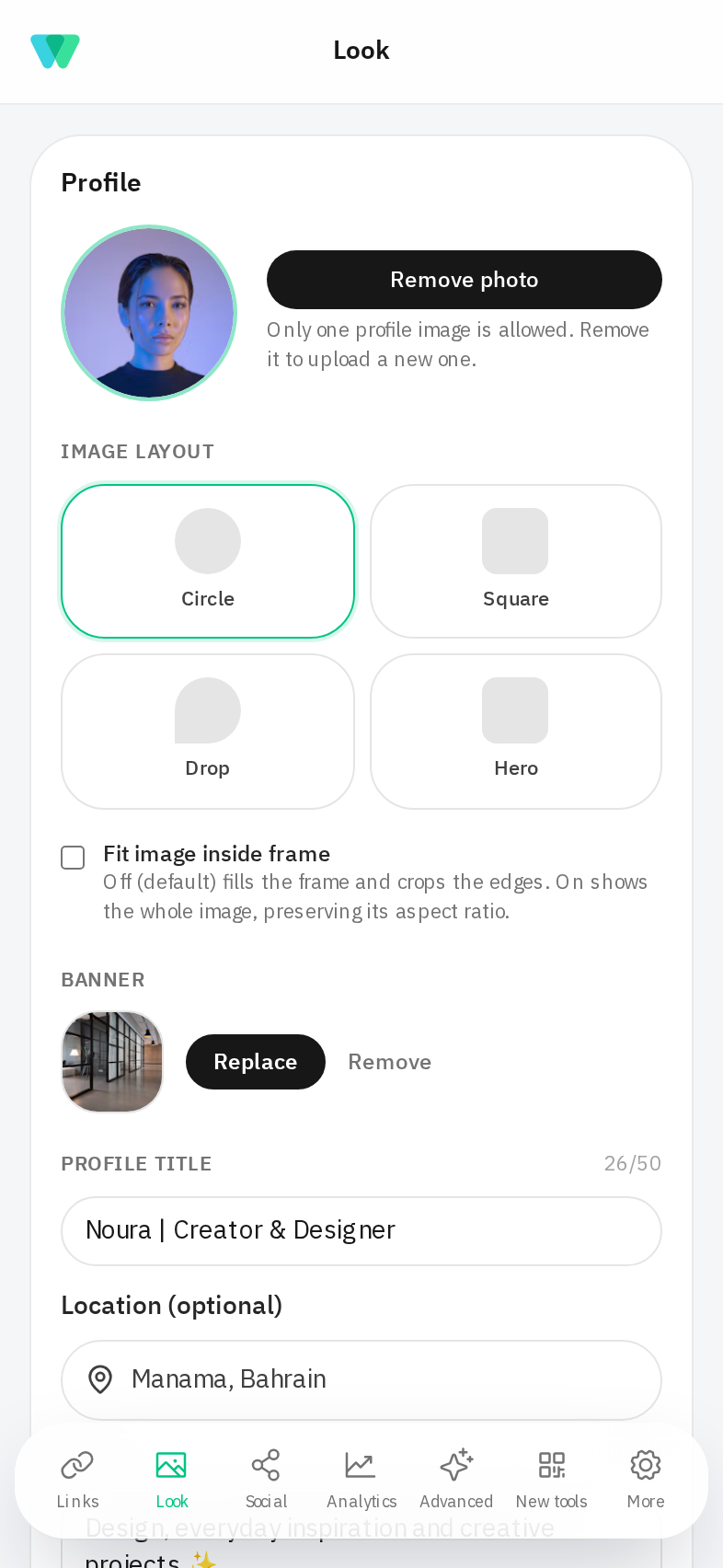
For Arabic-speaking audiences, give typography and right-to-left reading the same care as color. For brands serving international audiences, verify both language choices and responsive layouts. Simple design choices usually travel better across languages and devices than highly decorative text.
Understand views, clicks and audience behavior
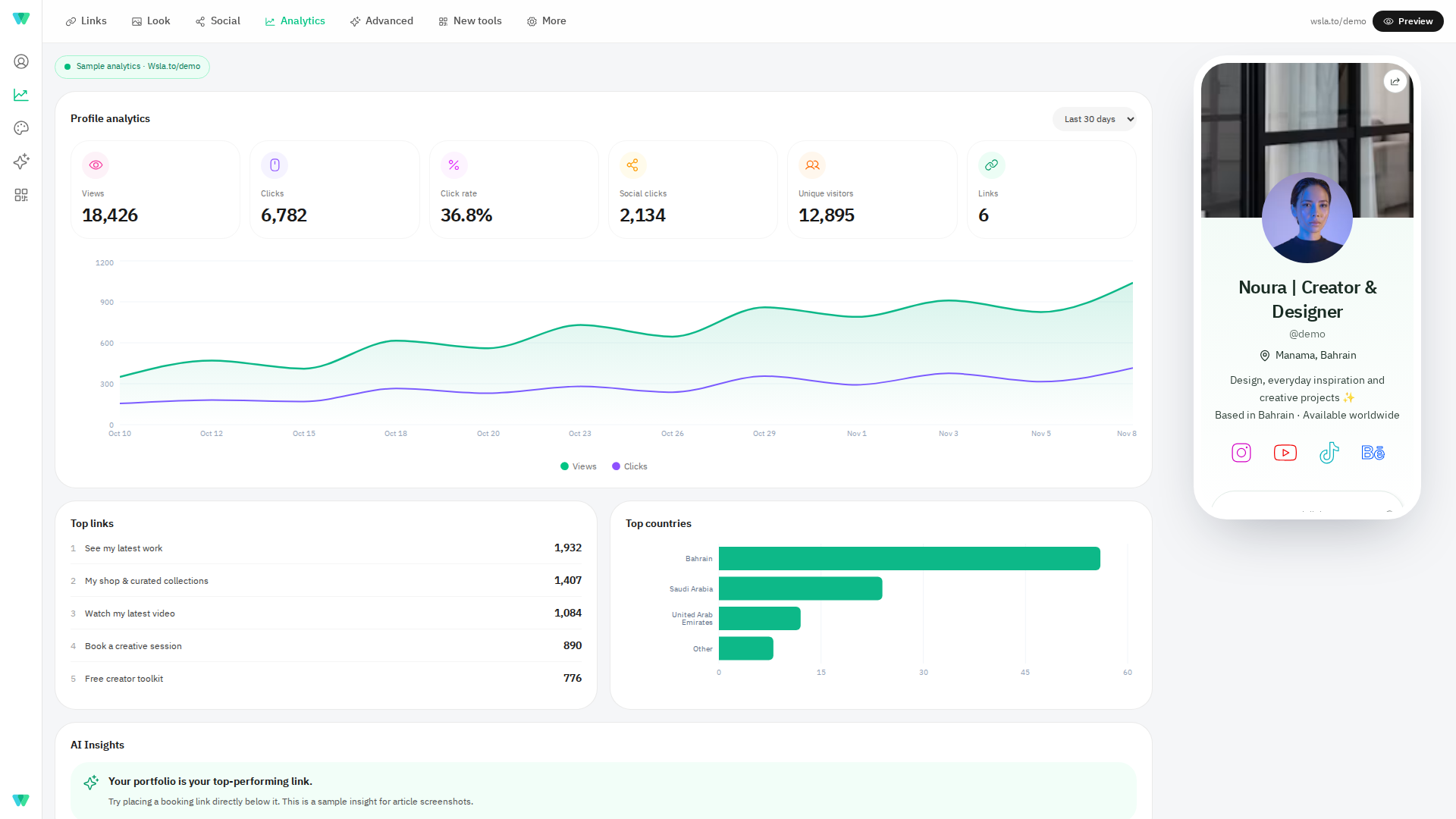
The analytics section offers a practical way to evaluate your link-in-bio page. A view tells you a profile was opened; link clicks signal which destinations attracted action. Unique visitors, social-icon clicks, countries and other breakdowns give helpful context. These are directional signals rather than proof of a sale, so compare them with your campaign goals.
Advanced analytics in Wsla 2.1
Wsla 2.1 introduces a richer analytics toolset: CSV export, dimension filtering, multiple chart styles, an interactive city map and per-social-icon details. These improvements are included in the 2.1 code release; check your dashboard for their availability as the production rollout and verification complete. The interactive demo illustrates the experience using fixed sample data, not real customer analytics.
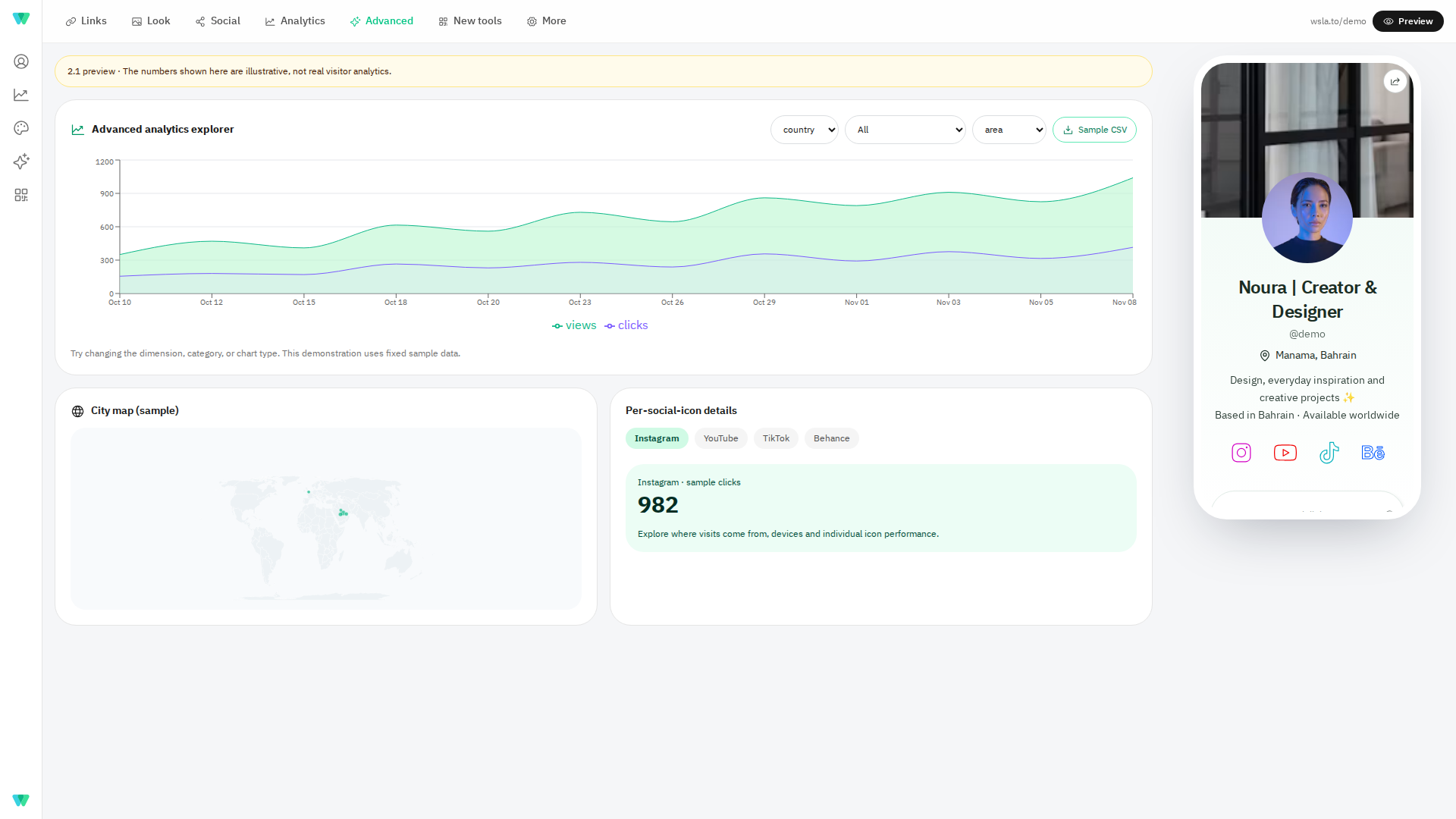
- CSV export: download the available data into a spreadsheet for further analysis.
- Dimensions: explore countries, cities, devices, browsers or traffic sources.
- Chart styles: switch visual presentations to match the question you want to answer.
- City map: visualize the approximate geographic distribution of visitor events when location data exists.
- Social-icon details: see which social destination attracts the most taps.
One useful workflow is to compare a social campaign against the traffic it brought to your profile. If most visits come from a mobile Instagram audience, optimize the first two links for phone users. If an unexpectedly popular destination attracts more clicks than your main offer, consider testing it higher on the page. Look at trends over time instead of interpreting one unusually busy day as a lasting change.
QR codes, short links and visitor protection
A Wsla QR code can bridge a physical surface and a digital destination: a shop counter, business card, poster, event banner or package insert. Short URLs help you share an understandable destination in captions, videos, messages and campaigns. Both are useful when people encounter your brand somewhere other than your bio.
Wsla 2.1 expands QR export development beyond PNG, JPG, SVG and PDF with EPS and animated GIF options. The animated format is intended to retain compatible center-logo motion while keeping the QR pattern stable. Always test the exported code on several phones before printing or distributing it; EPS output may embed raster artwork rather than being fully vector.
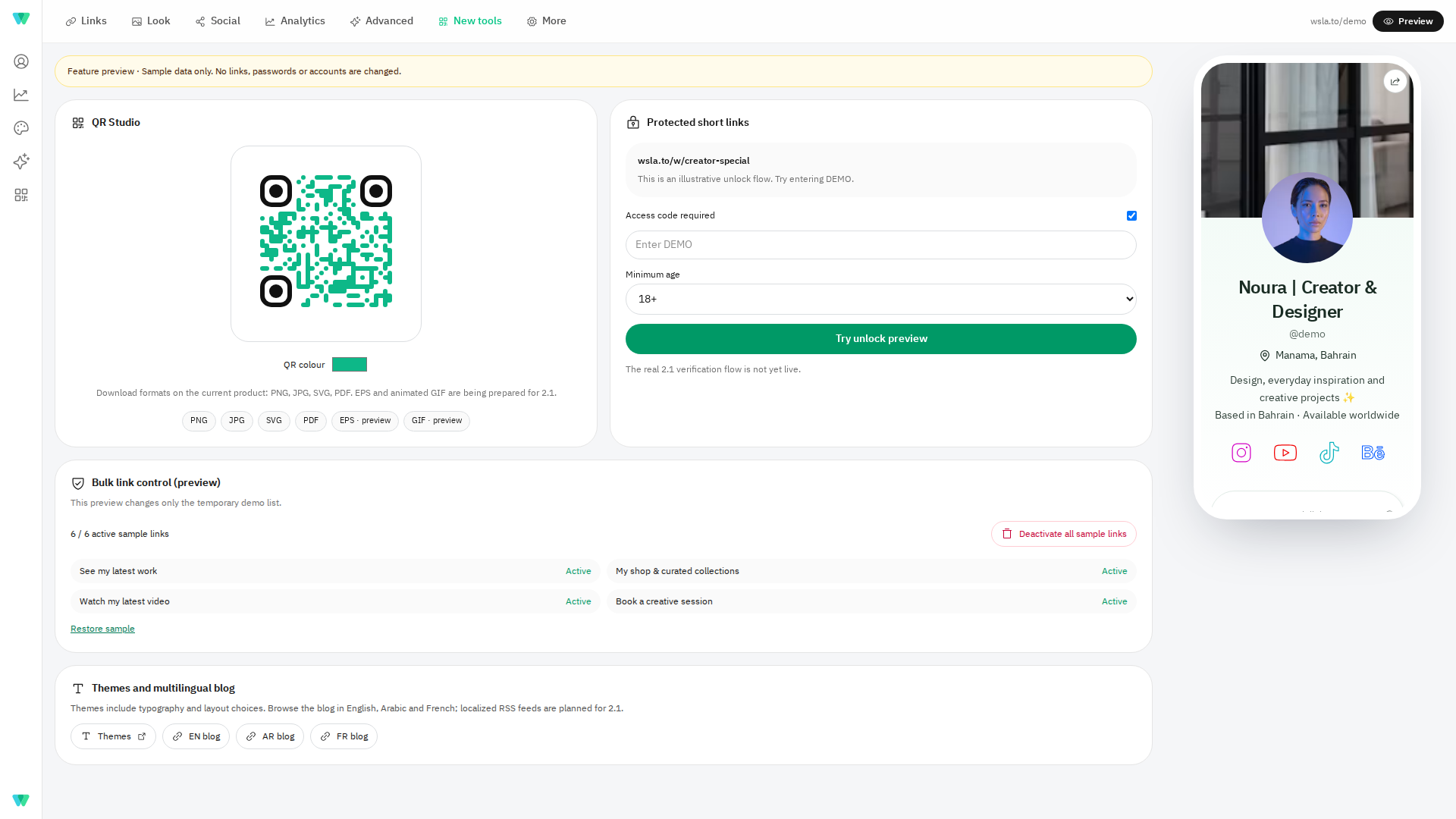
Wsla 2.1 adds a protected short-link unlock flow for configured access restrictions. Visitors can enter an access code and, where applicable, complete a self-reported age check before continuing to the destination. An age prompt is not an identity or age-verification service; security also depends on correct configuration and rate limiting.
Organize your page without deleting your data
When a campaign ends, Wsla 2.1 makes link management simpler with a confirmation-driven bulk-deactivation action in link-in-bio Settings. It is designed to switch off currently active links without deleting their records or historical analytics. The demo uses disposable sample links and never changes a real account.
Blog updates in three languages
The Wsla blog shares practical guidance for creators and small businesses. Wsla 2.1 includes localized RSS feed support for English, Arabic and French so readers can follow updates in their preferred language, where translations are available.
Explore the Wsla Blog, browse themes, or revisit our free link-in-bio setup guide. This release post is currently English-only, as requested; we will add localized editions only after translation review.
A practical setup checklist for creators and small businesses
- Choose a username that works in captions, email signatures and QR destinations.
- Add a clear profile description and a recognizable image or logo.
- Publish your most valuable link first and name each button for the result it delivers.
- Check theme colors, text legibility, mobile spacing and Arabic/English presentation.
- Add relevant social channels instead of every account you have ever used.
- Test links and QR codes from an actual phone.
- Review analytics after a campaign has enough activity to form a meaningful pattern.
- Archive or deactivate expired campaign links instead of sending visitors to outdated pages.
Frequently asked questions
Is Wsla 2.1 free to use?
Wsla offers a free plan alongside paid tiers. Available quotas and advanced tools depend on the active plan; check the current pricing page before deciding which one fits your needs.
Can I use the demo without creating an account?
Yes. The public demo profile is available as a sample experience. The mock administration screens in the demo use fictional content; they do not edit a user's account.
Where can I find the Wsla 2.1 analytics tools?
The 2.1 code release includes CSV export, chart switching, city mapping, social-icon details and dimension exploration. Open the Analytics area of your Wsla dashboard to check which tools are available on your plan. The public demo uses fictional data and is not a live analytics report.
Will changing my theme remove my fonts?
Theme application in Wsla 2.1 is designed to preserve typography as part of the theme. Review the result in the Look area after applying a theme.
What can I share with a QR code?
You can create QR codes for supported Wsla destinations and use them on physical and digital materials. Always test the exact URL and printed code before distributing it, especially when customizing the logo, colors or dimensions.
Can a link have an access code?
Wsla 2.1 includes an unlock flow for supported protected short URLs. Availability depends on the active deployment and configuration. Use a strong access code and test the full redirect before sharing.
Start with one page, then improve what matters
The best place to start is not a complicated growth stack. It is a clear and reliable destination that tells people who you are and what they can do next. Use Wsla to bring your links and content together, make the design your own, and improve it with real audience feedback. Try the interactive demo, then create your own Wsla profile.
Keep reading
Get the Wsla newsletter
One short email, every Friday. Product updates, creator stories, and growth playbooks.